Morgantara Font Review
As a web designer, I often find myself searching for the perfect typeface to elevate a project’s visual identity. Morgantara has quickly become one of my go-to fonts for adding a touch of elegance and personality to digital designs. Its bold cursive style brings a sense of movement and charm that works well in both modern and traditional contexts.
A Bold Script with Versatile Appeal
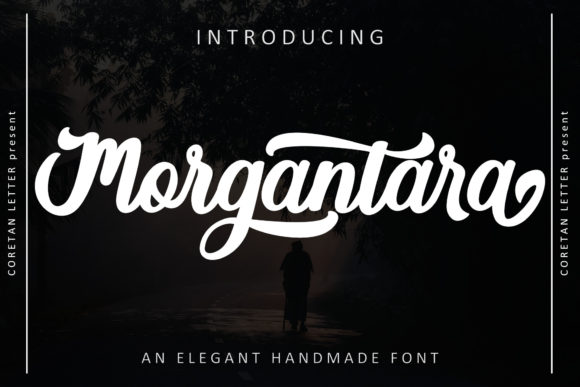
Morgantara is a script font that blends beauty with strength. Its flowing lines and distinctive swashes make it ideal for headings, logos, and decorative elements. The PUA encoding ensures that all glyphs and alternates are easily accessible, which is a big plus when working on custom typography projects.
What stands out about Morgantara is how it maintains its character across different sizes and styles. Whether used in a large hero section or a small button, it retains its clarity and visual impact. This makes it a great choice for designers looking to add a unique touch without sacrificing readability.
Perfect for Web Headers and Hero Sections
I tested Morgantara on a boutique online store landing page, where it was used as the main headline. The font added an immediate sense of sophistication and helped draw attention to key messages. It paired beautifully with a clean sans serif font for the body text, creating a balanced and professional look.
In responsive layouts, Morgantara scaled well on mobile devices, maintaining its legibility even at smaller sizes. When placed over image banners or dark backgrounds, it provided enough contrast to remain visible while still feeling soft and inviting.
Enhancing Brand Identity and User Engagement
Using Morgantara in a creative portfolio site gave the design a personal and artistic feel. It worked especially well in the navigation bar, where it served as a subtle yet impactful accent. The font also made a strong impression on a course sales page, where it was used in call-to-action buttons and section headers.
The font’s expressive nature helps create a more engaging user experience. It can be used to highlight important information, guide users through content, or simply add a stylish touch to a website’s overall aesthetic. Its versatility makes it suitable for a wide range of industries, from fashion and lifestyle to education and technology.
Best Practices for Web Use
While Morgantara excels in display roles, it’s not ideal for long paragraphs of body text. Its decorative nature can make it harder to read in dense blocks of copy. For best results, use it sparingly and pair it with a complementary font that provides clarity and structure.
When designing for accessibility, consider using Morgantara in larger sizes and ensuring sufficient contrast against background colors. It works well on light backgrounds but may need adjustments when used on dark themes. Testing the font on multiple screen sizes and devices is always a good idea to ensure it performs consistently.
Pairing Morgantara with Other Fonts
One of the strengths of Morgantara is how well it pairs with other typefaces. A simple sans serif like Lato or Montserrat complements its cursive style without overwhelming it. For a more editorial feel, pairing it with a serif font such as Georgia or Playfair Display can create a classic and refined look.
For a modern and minimal approach, combining Morgantara with a bold display font can add depth and visual interest. The key is to maintain a clear hierarchy so that the most important elements stand out while the rest of the design remains cohesive.
Considerations for Digital Projects
Before integrating Morgantara into a website or digital project, check the available styles, weights, and file formats. Make sure the font supports the languages you’ll be using and that the licensing allows for commercial use if needed. Some fonts may require additional steps to convert into web-friendly formats like WOFF or WOFF2.
For designers working on client projects, it’s also important to confirm that the font is compatible with their workflow. Morgantara’s PUA encoding makes it easy to access all glyphs, which is helpful when creating custom designs or editing text in design software.